NOTE
Mr. Gordon co-wrote this tutorial with the Claude Anthropic large language model.
He started with excerpts of code pulled from the LCS Check In app (currently being used to track breakfast check-ins for boarding students).
Mr. Gordon then asked the LLM to write a summary of the differences between an array and a dictionary, and then edited and expanded the results to come up with what you see below.
Introduction
When dealing with an array of data, we might want to present that information in a grouped manner to our users in some situations.
Consider the example below – please watch this super-short video:
Comparing data structures
So how does that work?
Let’s look at the difference between an array and a dictionary using the ArrivalStatus structure, in the context of an attendance taking app, as our example:
struct ArrivalStatus: Identifiable {

    // MARK: Stored properties
    let id: Int
    let arrivalId: Int?
    let house: String
    let lastName: String
    let firstName: String
    let ageCategory: String
    let emailOrganizer: String?
    let checkInMethod: CheckInMethod?
    let arrivalCategory: ArrivalCategory?
    let arrivalTime: Date?

    // MARK: Decoding hints
    // (e.g.: If instances of this data type were
    //  obtained from a cloud-hosted database)
    enum CodingKeys: String, CodingKey {

        case id
        case arrivalId = "arrival_id"
        case house
        case lastName = "last_name"
        case firstName = "first_name"
        case ageCategory = "age_category"
        case emailOrganizer = "email_organizer"
        case checkInMethod = "check_in_method_id"
        case arrivalCategory = "arrival_category_id"
        case arrivalTime = "arrival_time"

    }

}
Array
An array is a simple, ordered collection of items. For example, arrivalStatuses is an array of ArrivalStatusobjects, arranged in a sequence. Each element can be accessed by its position (index) in the array.
For example, if we had the following array:
let arrivalStatuses = [
    ArrivalStatus(id: 1, arrivalId: 101, house: "Colebrook", lastName: "Johnson", firstName: "Emma", ageCategory: "Senior", emailOrganizer: "johnson.e@school.edu", checkInMethod: .scan, arrivalCategory: .onTime, arrivalTime: Date()),
    ArrivalStatus(id: 2, arrivalId: 102, house: "Grove", lastName: "Smith", firstName: "Michael", ageCategory: "Junior", emailOrganizer: "smith.m@school.edu", checkInMethod: .manual, arrivalCategory: .onTime, arrivalTime: Date()),
    ArrivalStatus(id: 3, arrivalId: 103, house: "Colebrook", lastName: "Brown", firstName: "Sophia", ageCategory: "Senior", emailOrganizer: "brown.s@school.edu", checkInMethod: .scan, arrivalCategory: .late, arrivalTime: Date())
]
…you would access elements using their index, like arrivalStatuses[0] for Emma Johnson’s data.
Dictionary
A dictionary is a collection of key-value pairs.
We can use a computed property, say, arrivalStatusesByHouse, to transform an array:
var arrivalStatusesByHouse: [String: [ArrivalStatus]] {
    return Dictionary(grouping: arrivalStatuses) { currentStatus in
        currentStatus.house
    }
}
… into a dictionary where:
- Each key is a house name (like “Colebrook” or “Grove”)
- Each value is an array of all
ArrivalStatusobjects for that specific house
Using our example data above, the resulting dictionary would look like:
[
    "Colebrook": [
        ArrivalStatus(id: 1, arrivalId: 101, house: "Colebrook", lastName: "Johnson", firstName: "Emma", ...),
        ArrivalStatus(id: 3, arrivalId: 103, house: "Colebrook", lastName: "Brown", firstName: "Sophia", ...)
    ],
    "Grove": [
        ArrivalStatus(id: 2, arrivalId: 102, house: "Grove", lastName: "Smith", firstName: "Michael", ...)
    ]
]
You would access elements by their key, for example, arrivalStatusesByHouse["Colebrook"] would get all Colebrook house students.
Key differences
- Access method:
- Array: Elements are accessed by position/index (e.g.,
arrivalStatuses[0]) - Dictionary: Elements are accessed by key (e.g.,
arrivalStatusesByHouse["Colebrook"])
- Array: Elements are accessed by position/index (e.g.,
- Organization:
- Array: Simple sequential list
- Dictionary: Organized by categories (in this case, by house)
- Purpose:
- Array: Good for ordered collections where position matters
- Dictionary: Ideal for grouping and quick lookup by category
Transforming an array into a dictionary
The arrivalStatusesByHouse computed property works by using Swift’s Dictionary(grouping:by:) initializer. Here’s how it functions:
var arrivalStatusesByHouse: [String: [ArrivalStatus]] {
    return Dictionary(grouping: arrivalStatuses) { currentStatus in
        currentStatus.house // group by this property
    }
}- It takes the
arrivalStatusesarray as input - For each
ArrivalStatusobject in the array, it:- Extracts the
houseproperty (the closure specifies this as the grouping key) - Groups that object with others that have the same house value
- Extracts the
- It returns a new dictionary with house names as keys and arrays of matching students as values
This transformation makes it much easier to work with students grouped by house rather than having to filter the array repeatedly.
Displaying the data
Let’s see how we would iterate over each data structure using SwiftUI’s List component:
Displaying an array
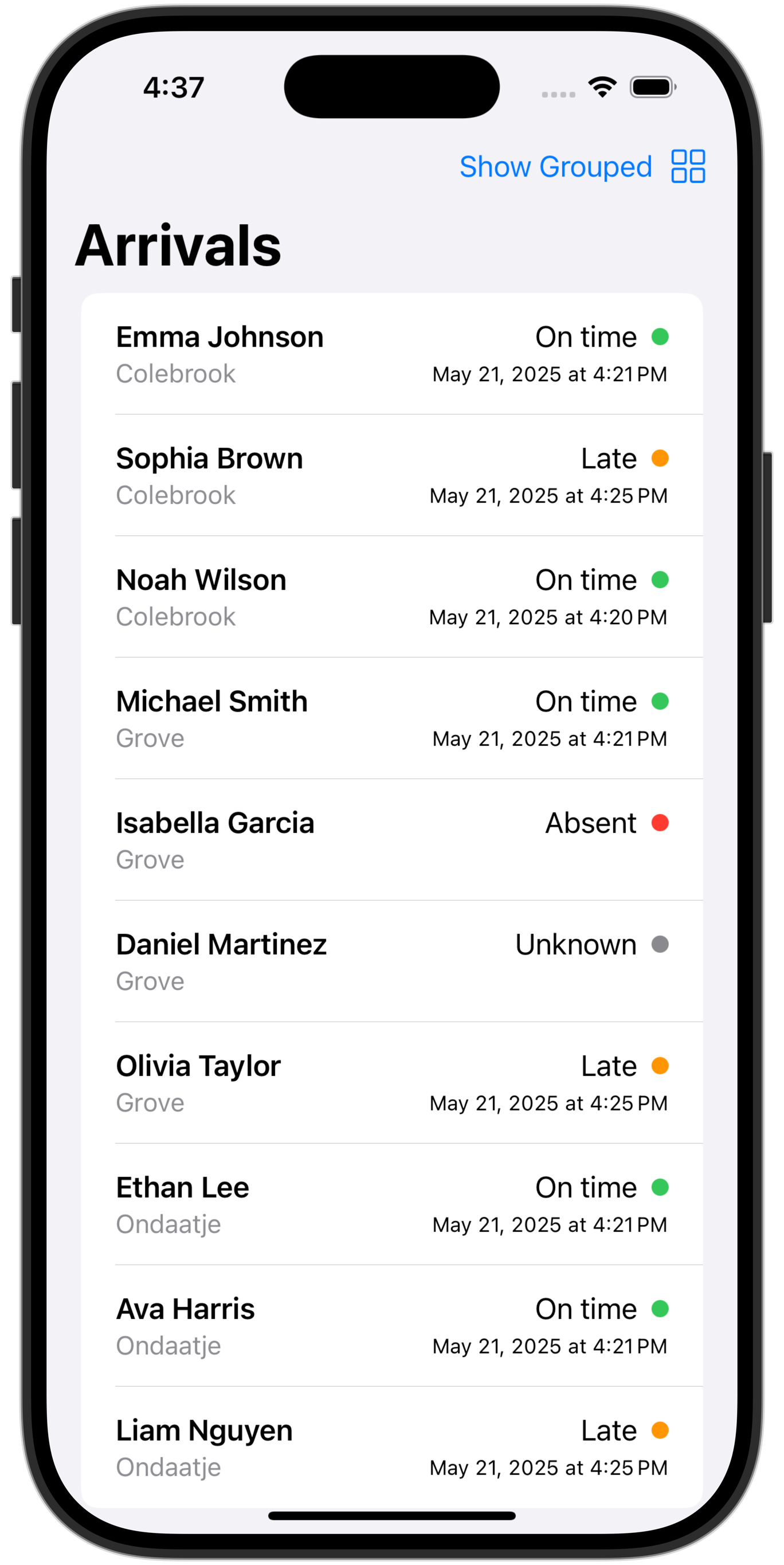
// 1. Simple array-based view (flat listing of all students)
struct ArrivalListView: View {

    // MARK: Stored properties
    let dataProvider: ArrivalsDataProvider

    // MARK: Computed properties
    var body: some View {
        List {
            ForEach(dataProvider.arrivalStatuses) { status in
                ArrivalRow(
                    status: status,
                    showingHouse: true
                )
            }
        }
    }
}

#Preview {
    ArrivalListByHouseView(dataProvider: ArrivalsDataProvider())
}

// Shared row view for both list types
struct ArrivalRow: View {

    // MARK: Stored properties
    let status: ArrivalStatus
    let showingHouse: Bool

    // MARK: Computed properties
    var body: some View {
        HStack(alignment: .top) {
            VStack(alignment: .leading) {
                Text("\(status.firstName) \(status.lastName)")
                    .font(.headline)
                Text(status.house)
                    .font(.subheadline)
                    .foregroundColor(.gray)
                    .opacity(showingHouse ? 1.0 : 0.0)
            }

            Spacer()

            // Display arrival status indicator
            ArrivalStatusIndicator(status: status)
        }
        .padding(.vertical, 4)
    }
}
This creates a simple flat list of all students’ arrival statuses, that looks like this:
Displaying a dictionary
//
//  ArrivalListByHouseView.swift
//  ArrayVersusDictionaryExample
//
//  Created by Russell Gordon on 2025-05-21.
//

import SwiftUI

// 2. Dictionary-based view (grouped by house)
struct ArrivalListByHouseView: View {

    // MARK: Stored properties
    let dataProvider: ArrivalsDataProvider

    // MARK: Computed properties
    var body: some View {

        // Make a scrollable list
        List {

            // Get the keys of the dictionary (which is each house)
            let houses = dataProvider.arrivalStatusesByHouse.keys.sorted()

            // Iterate over the houses (keys)
            ForEach(houses, id: \.self) { currentHouse in

                // Make a section for each house
                Section(header: Text(currentHouse)) {

                    // Access the values (students) connected to this key (the house)
                    let studentsInCurrentHouse = dataProvider.arrivalStatusesByHouse[currentHouse]!

                    // Iterate over the students
                    ForEach(studentsInCurrentHouse) { status in
                        ArrivalRow(
                            status: status,
                            showingHouse: false
                        )
                    }
                }
            }
        }
    }
}

#Preview {
    ArrivalListByHouseView(dataProvider: ArrivalsDataProvider())
}
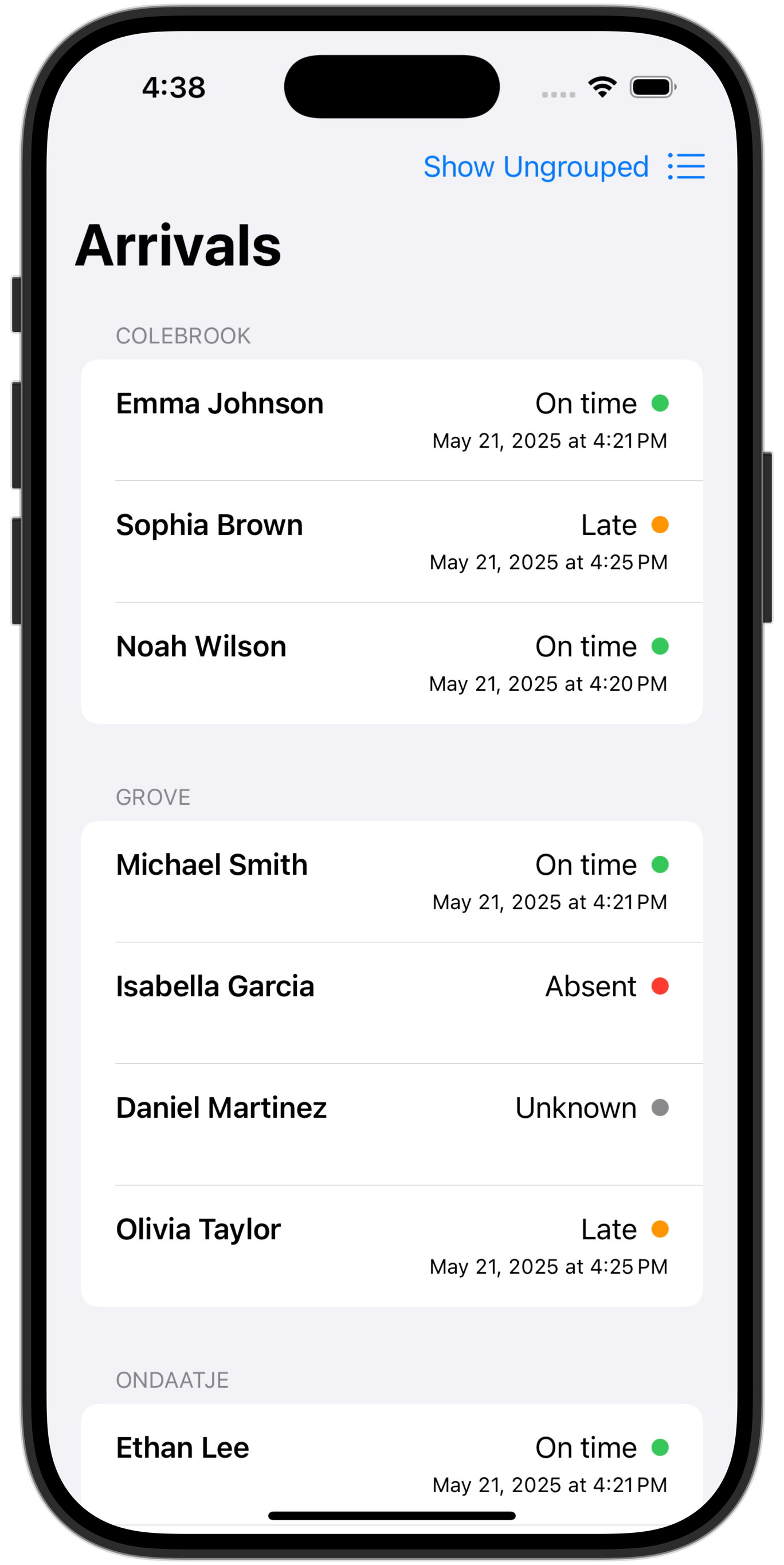
This creates a sectioned list where:
- The outer
ForEachiterates through each house name (the dictionary keys) - Each house becomes a section header
- The inner
ForEachiterates through each student in that house
This creates a list of student arrival statuses, grouped by house, that looks like this:
Summary
- Structure:
- Array approach: Creates a flat list
- Dictionary approach: Creates a hierarchical list with sections
- Organization:
- Array approach: Shows all students in whatever order the array has them
- Dictionary approach: Groups students by house, making it easier to find specific houses
- Visual Hierarchy:
- Array approach: No visual grouping (unless you add it manually)
- Dictionary approach: Built-in visual separation between houses
Complete source code
Try it out!
You are welcome to clone the repository of the example code discussed above or download a Zip file of the project.