Recap
Early on in this course we learned about variables and constants, each of which can hold a single value of a given data type:
var score = 0           // variable, data type is Int
let acceleration = 9.8  // constant, data type is Double
Structures allow us to describe more interesting data by grouping related individual variables and constants:
struct Person {

    // MARK: Stored properties
    let age: Int
    let hairColour: String
    let name: String
    let height: Double
    let mass: Double

}
We can then create as many instances of a structure as needed:
let joyce = Person(
    age: 16,
    hairColour: "black",
    name: "Joyce",
    height: 160,
    mass: 58
)

let mrGordon = Person(
    age: 46,
    hairColour: "orange",
    name: "Gordon",
    height: 180,
    mass: 78
)
What is an array?
Variables and constants store a single value inside them.
An array is another programming language abstraction that lets us store many values at once.
We can then refer to those values using just one label, or name.
For example, here is an array that stores some of the house names here at Lakefield College School:
let houseNames = ["Matthews", "Uplands", "Cooper", "Moodie"]If we used individual constants to store those values, we’d have to do something like this:
let firstHouse = "Matthews"
let secondHouse = "Uplands"
let thirdHouse = "Cooper"
let fourthHouse = "Moodie"
As you will soon learn, putting many instances of data into an array is far more flexible and helps us to manage complexity in our apps.
Terminology
Let’s take a brief detour to address terminology.
The word array means the same thing as list.
When referring to a programming language abstraction that holds multiple values – most documentation and tutorials you will find online will use the term array.
All AP materials from the College Board – including questions on the Computer Science Principles exam – use the term list.
These are the same thing.
In this course, you will hear and use both words to refer to the same concept:
- array
- list
That way, you will be able to understand tutorials you find online, and be prepared for the AP CSP exam.
Essential knowledge
An array, or list, is a data structure that holds an ordered sequence of elements.
For example:
let blackPinkBand = ["Jisoo", "Jennie", "Rosé", "Lisa"]The blackPinkBand list has four elements.
An element is an individual value in a list that will always be assigned a unique index.
In the Swift programming language and nearly every other programming language, a list is zero-based.
That means the first element of a list has an index of 0.
The second element of a list has an index of 1.
Overall the blackPinkBand list is described this way:
| Index | Element |
|---|---|
| 0 | Jisoo |
| 1 | Jennie |
| 2 | Rosé |
| 3 | Lisa |
We can access individual elements of a list by their index.
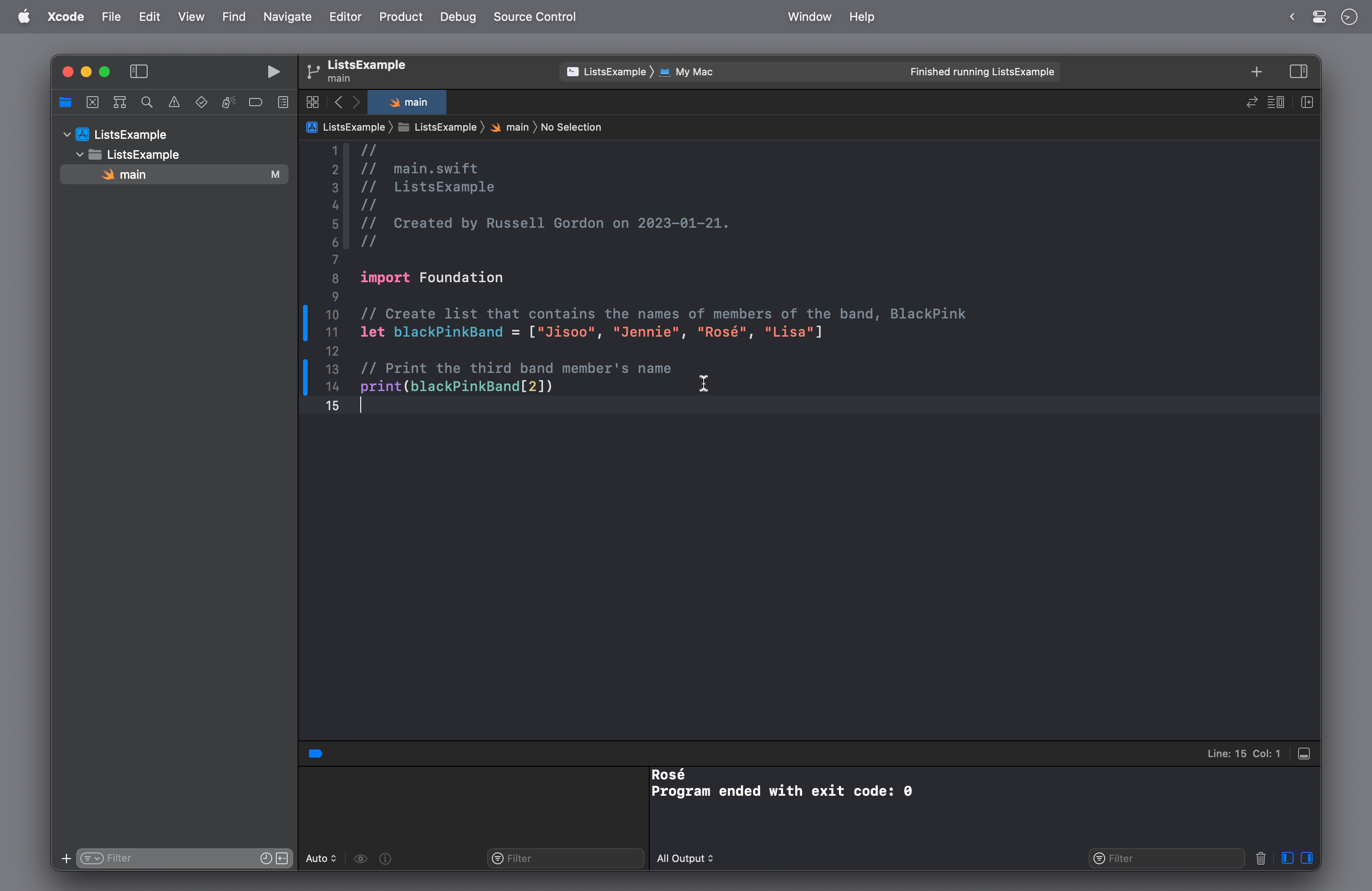
For example, in a command-line app – an app with a text-based user interface – we could print the third band member’s name using this code:
print(blackPinkBand[2])In a command-line app, the output looks like this:
TIP
In a command-line app, Xcode tells us that the program ended normally, without any errors, by showing the output:
Program ended with exit code: 0So, that will always appear when you run a command-line app. It is not an error but a success message. 🎉
If we try to access an element that does not exist:
print(blackPinkBand[4])…our app will crash. This is known as an Index out of range error.
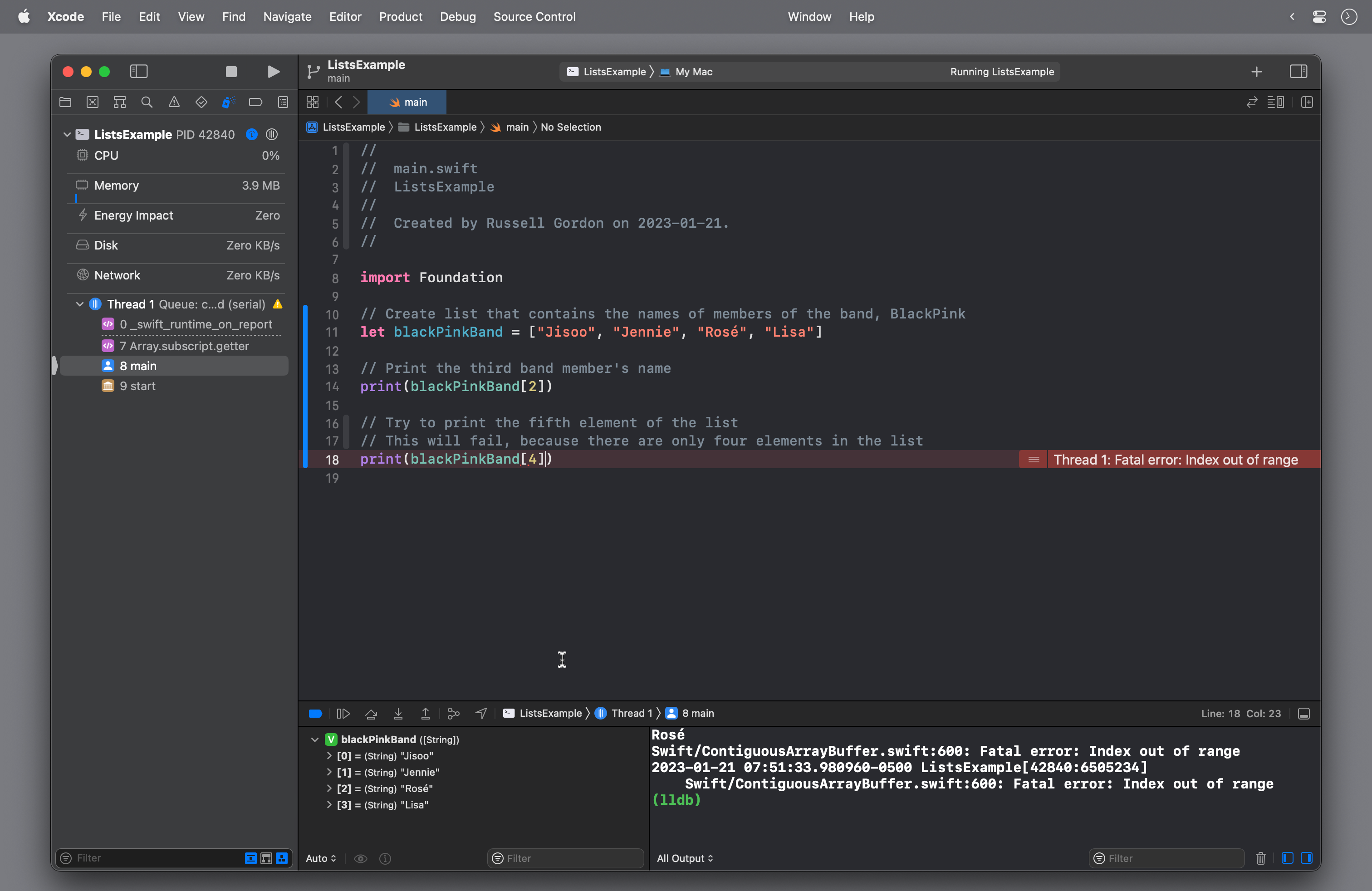
Remember, the list in this example has just four elements, which can be accessed using index values from 0 through 3:
| Index | Element |
|---|---|
| 0 | Jisoo |
| 1 | Jennie |
| 2 | Rosé |
| 3 | Lisa |
We “reached beyond the end of the list” when we tried to access a fifth element by using the index of 4:
print(blackPinkBand[4])Exercise 1
EXERCISE
- Create a new command-line macOS app named
TopTenListand then make a list that has ten elements.
For example, you might create a list of ten cities that you would like to visit someday, or your ten favourite ice cream flavours.
Then print the first, fifth, and final element of each list, similar to what was shown above.
Finally, try printing the eleventh element of your list.
Of course, that does not exist, and your app will crash. It’s good to become familiar with common reasons why your app might crash. Going past the end of a list is a very common programming error.
Share screenshots of your results in your portfolio post for today.
Iterating over lists
Loops are a natural friend to lists.
We can iterate over the values of a list using a loop.
Here is a loop that simply counts from zero to three:
// Count from 0 to 3
for i in 0...3 {
    print(i)
}
The output will be:
0
1
2
3
We could use a loop like that to iterate over the elements in the blackPinkBand list, and print their names on the screen:
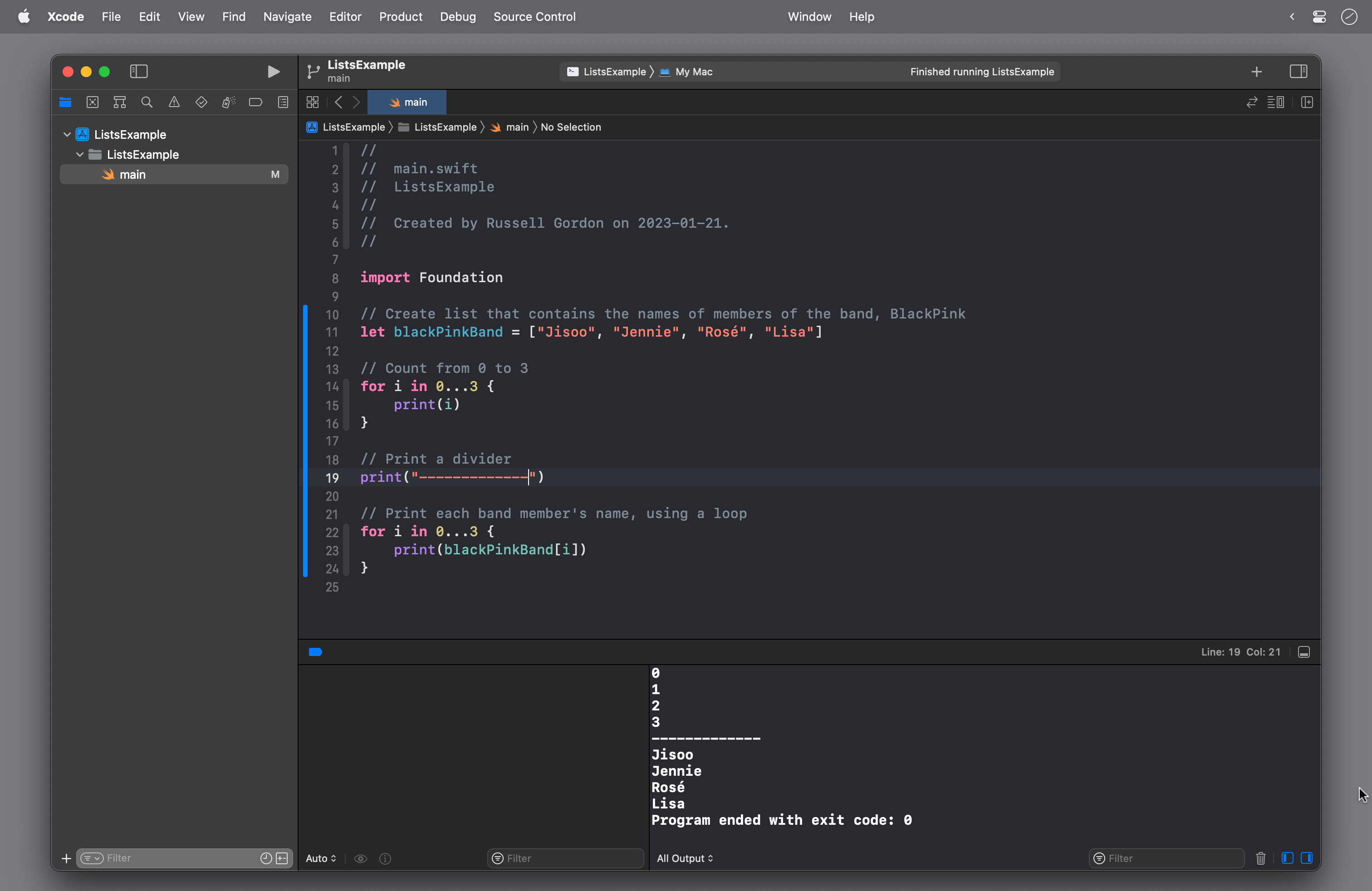
Here is a video of that code being run, so you can see what happens step by step:
However, this is not the best way to use a loop with a list in Swift.
Manually specifying the range of elements to iterate over, via the indices, like this:
for i in 0...3 {… is prone to error.
It’s very easy to make a mistake and go past the end of the array, by asking for an element using an index that does not exist:
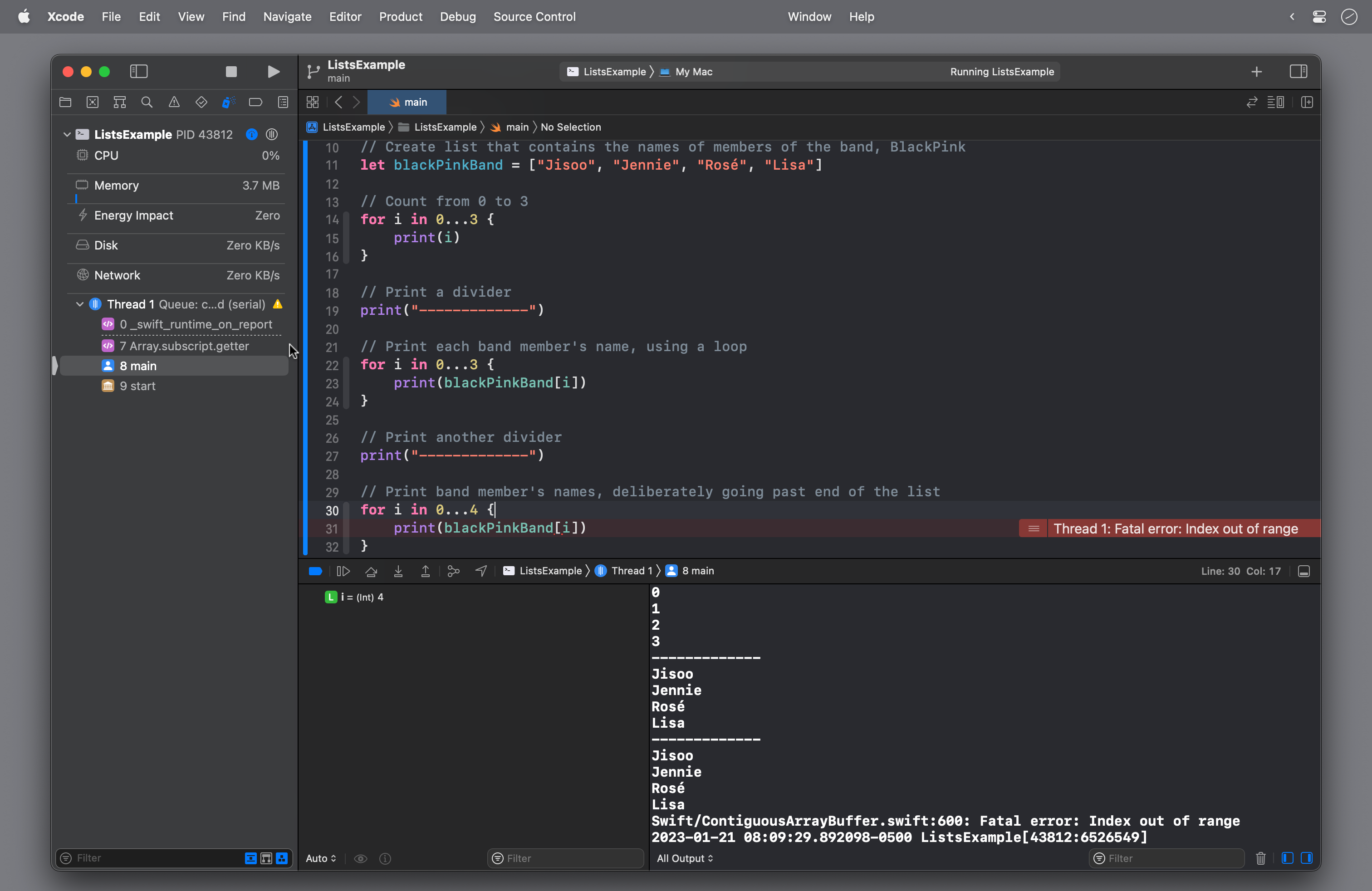
Here is a video of that code being run, so you can see what happens step by step:
TIP
“Index out of range” is one of the most common categories of programmer errors.
It is much better to use the following code:
// Print each band member's name
for bandMember in blackPinkBand {
    print(bandMember)
}
With a loop like this, the Swift compiler automatically iterates the correct number of times – four, in this case – since blackPinkBand contains four elements.
With each iteration of the loop, the value of bandMember is changed to temporarily hold the current element of the list.
Even better: if we are deliberate in how we name a list, the Xcode editor’s autocomplete is very helpful – this feature exists because iterating over a list is a very common task when developing an app:
Exercise 2
EXERCISE
- Extend your
TopTenListcommand-line app.
Referring to the examples in the section above, iterate over the values of your list and print them to the screen using two different approaches in code.
Share screenshots of your results in your portfolio post for today.
Scrollable Lists in SwiftUI
SwiftUI has a List structure, which provides a scrollable list of elements.
TIP
The name
Listis not an accident.The
Liststructure exists to make it easy to – wait for it – iterate over the elements of a list – also known as an array.More on how to use a
Liststructure with a list – an array – in our very next class.
One example of where a List is useful would be in the World Clock interface we built earlier in this module:
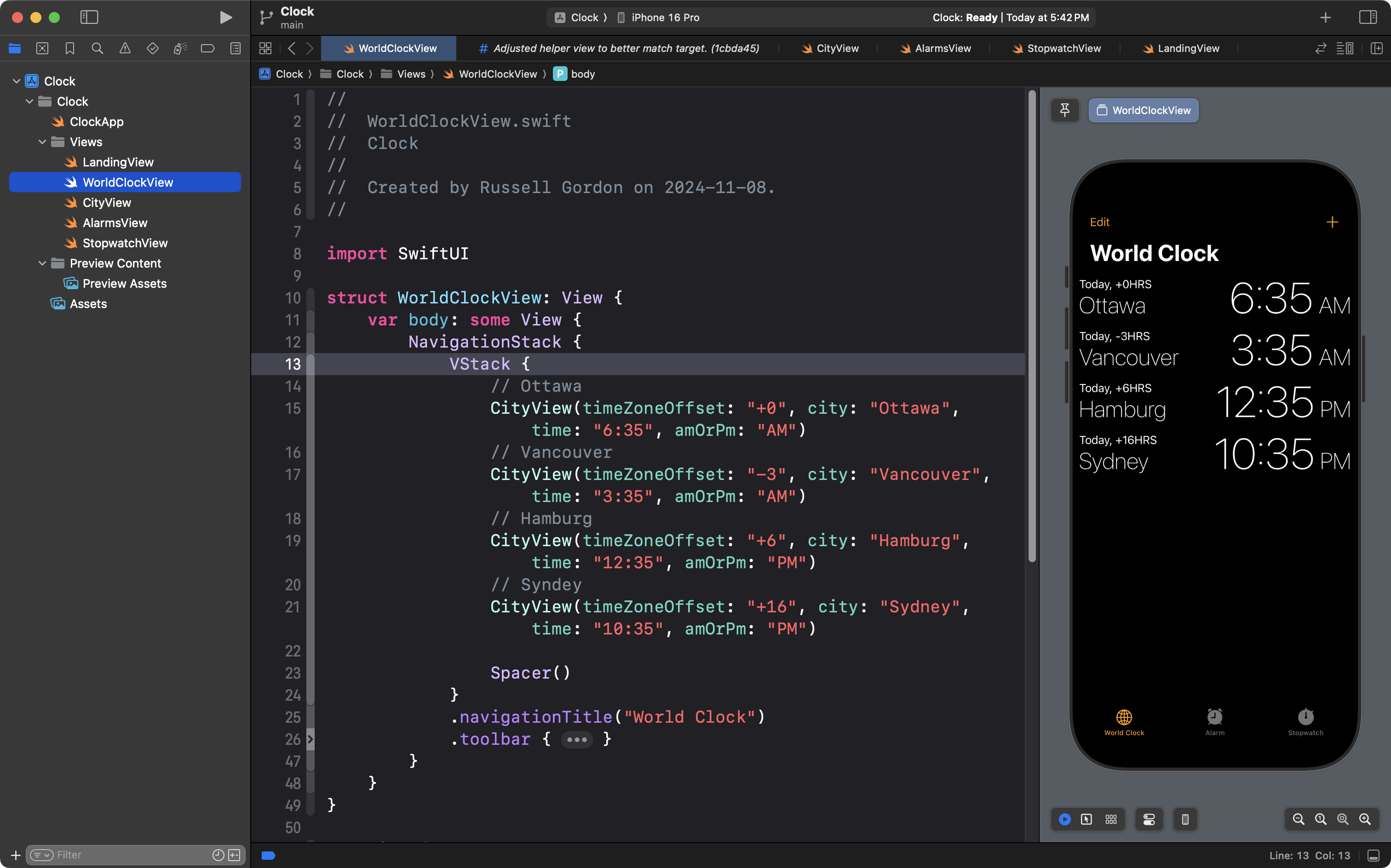
In the example above, a VStack is used to show each city that we created a clock for. A Spacer view is used to push the cities up to the top of the interface.
Instead of that approach, we can:
- Replace the
VStackwithList - Remove the
Spacer - Use the view modifier
.listStyle(.plain)
This achieves the desired visual look and feel:

As a bonus, the interface is now scrollable:
However, let’s look again at the code:
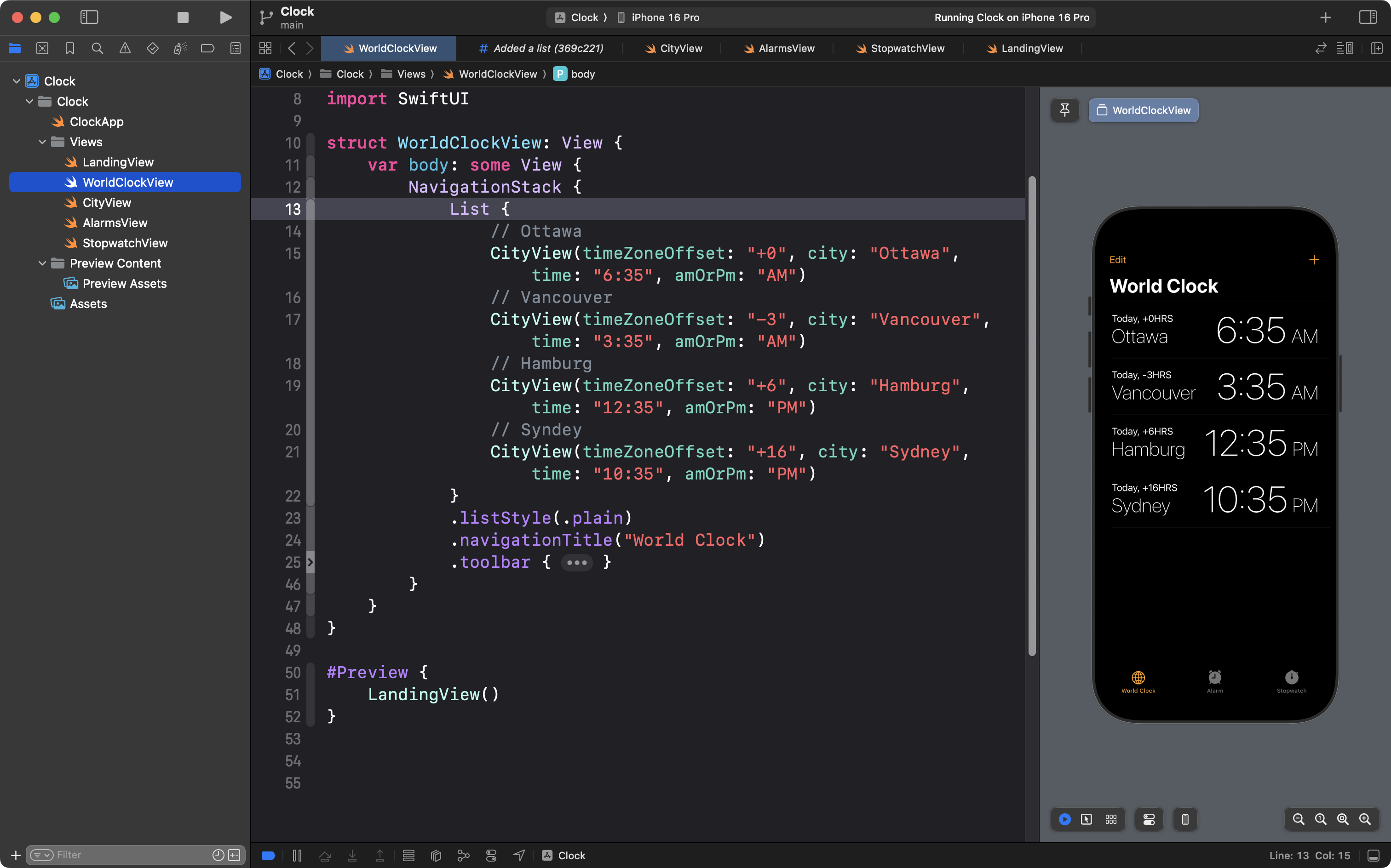
Isn’t this a bit… repetitive?
Recall the number one rule of software development:
D.R.Y. or Don’t Repeat Yourself
How can we fix this?
We can apply just a little bit more abstraction.
Notice the call sites where an instance of CityView is created:

Each time an instance of CityView is made, four questions are asked:
- What is the time zone offset?
- What city?
- What time?
- AM or PM?
… and all four questions must be answered.
The call sites are messy.
What if they could be simplified?
What if we created a structure that models a city? Like this:
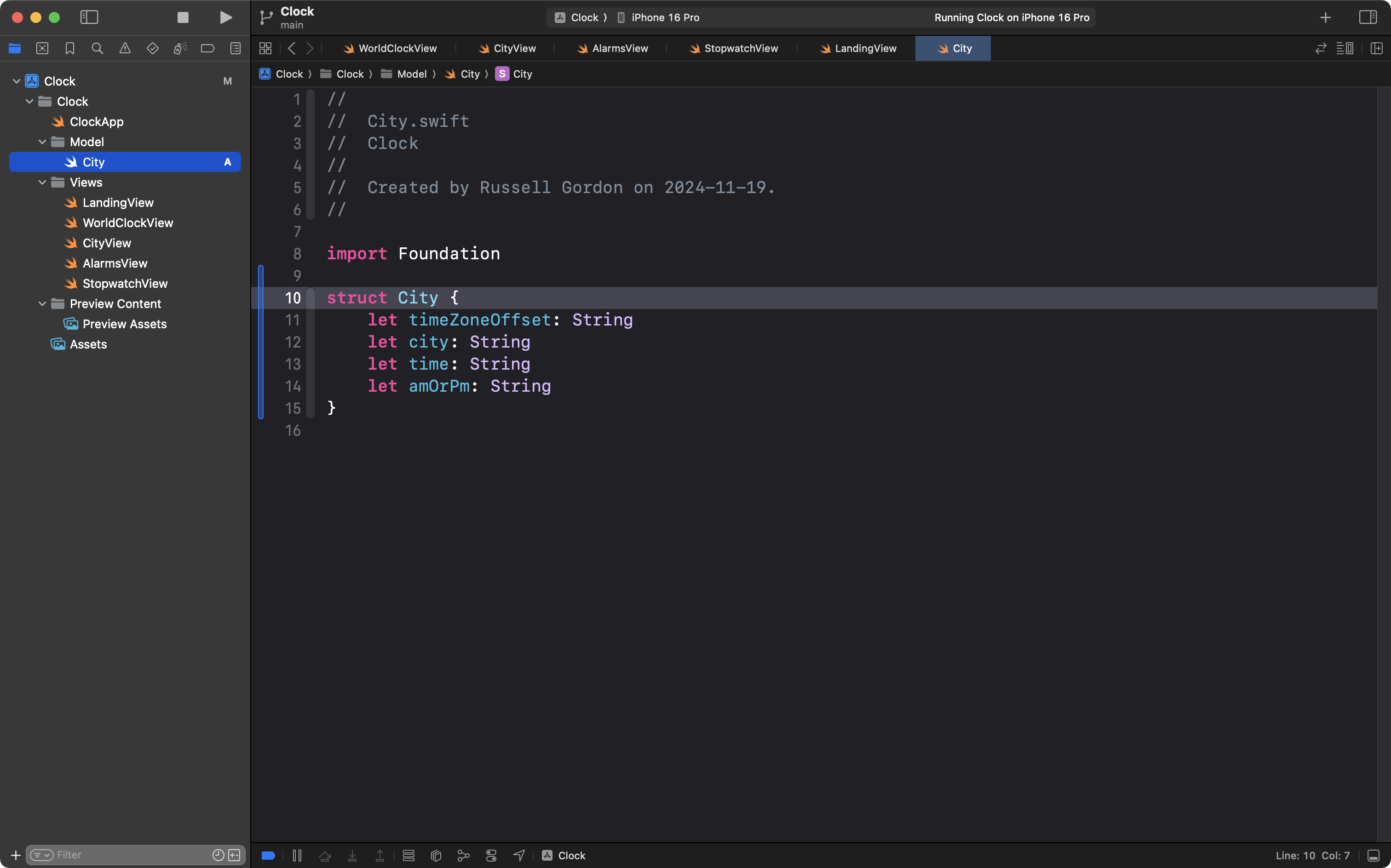
Then we could create instances of that structure, to hold the relevant data for each city:
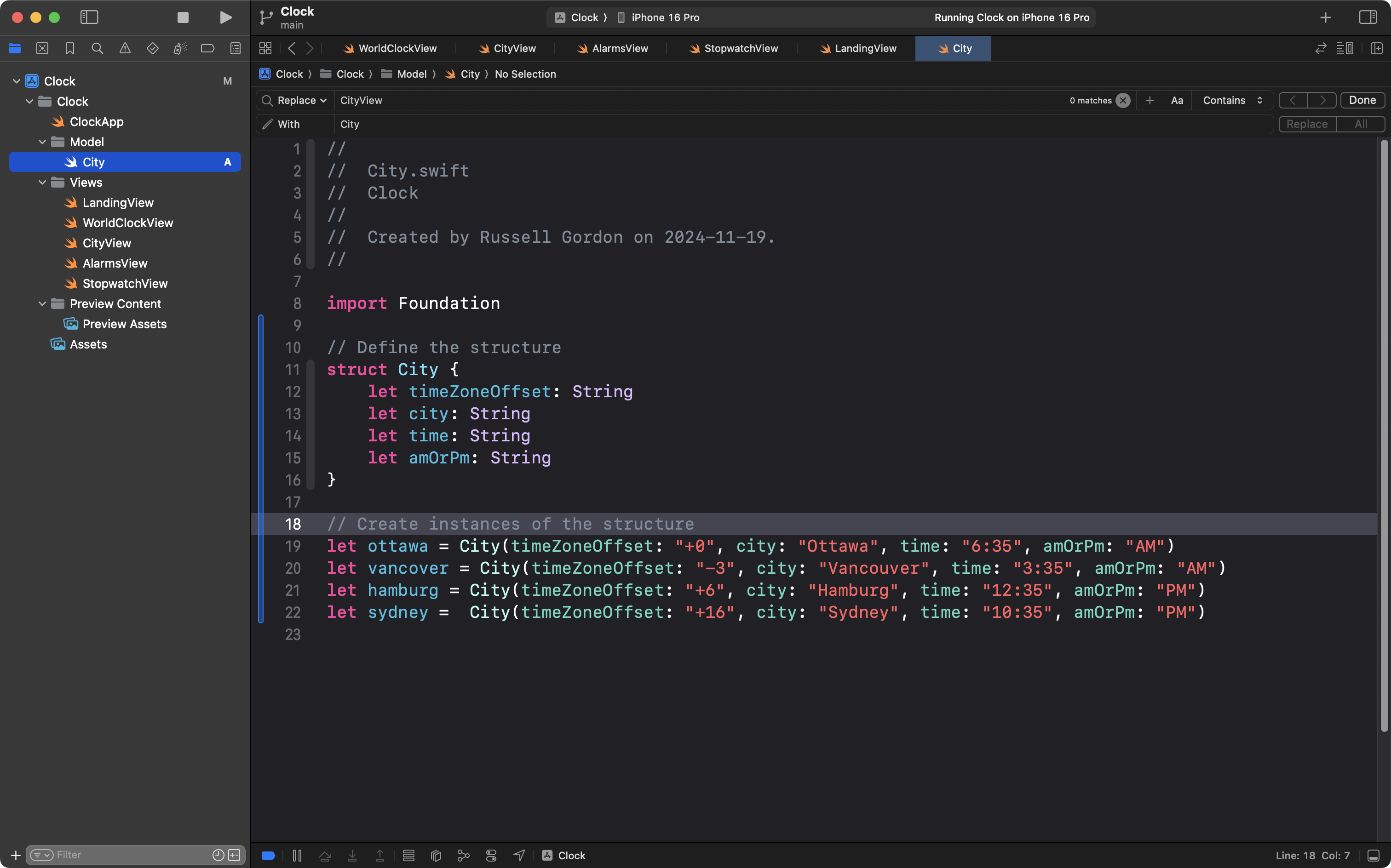
NOTE
This is exactly the same as work we did earlier in this course, as shown here:
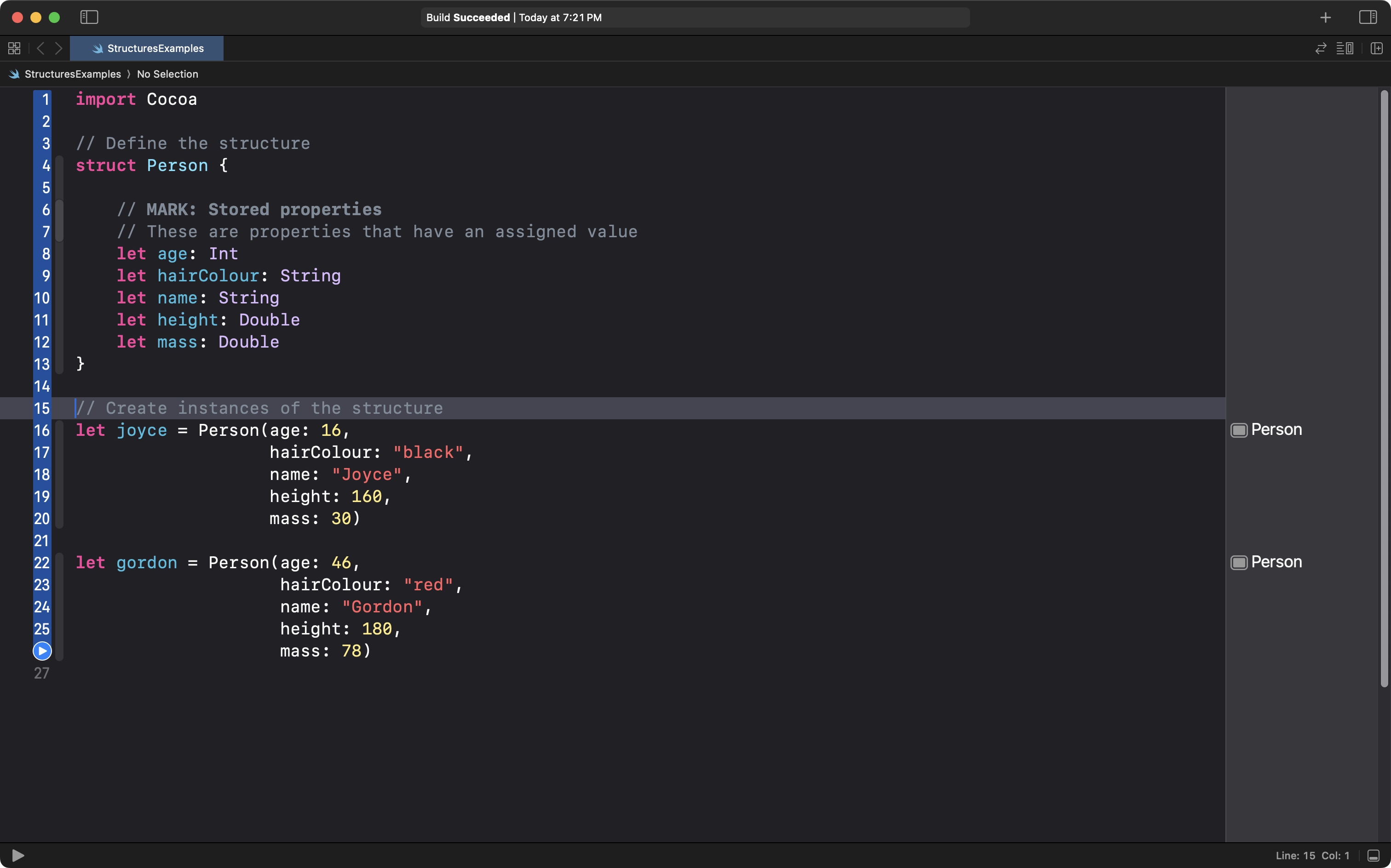
So what is the advantage of this? We can then change our CityView structure from this – where four stored properties are defined:

To this instead, where we just define a single stored property – which city should be shown:
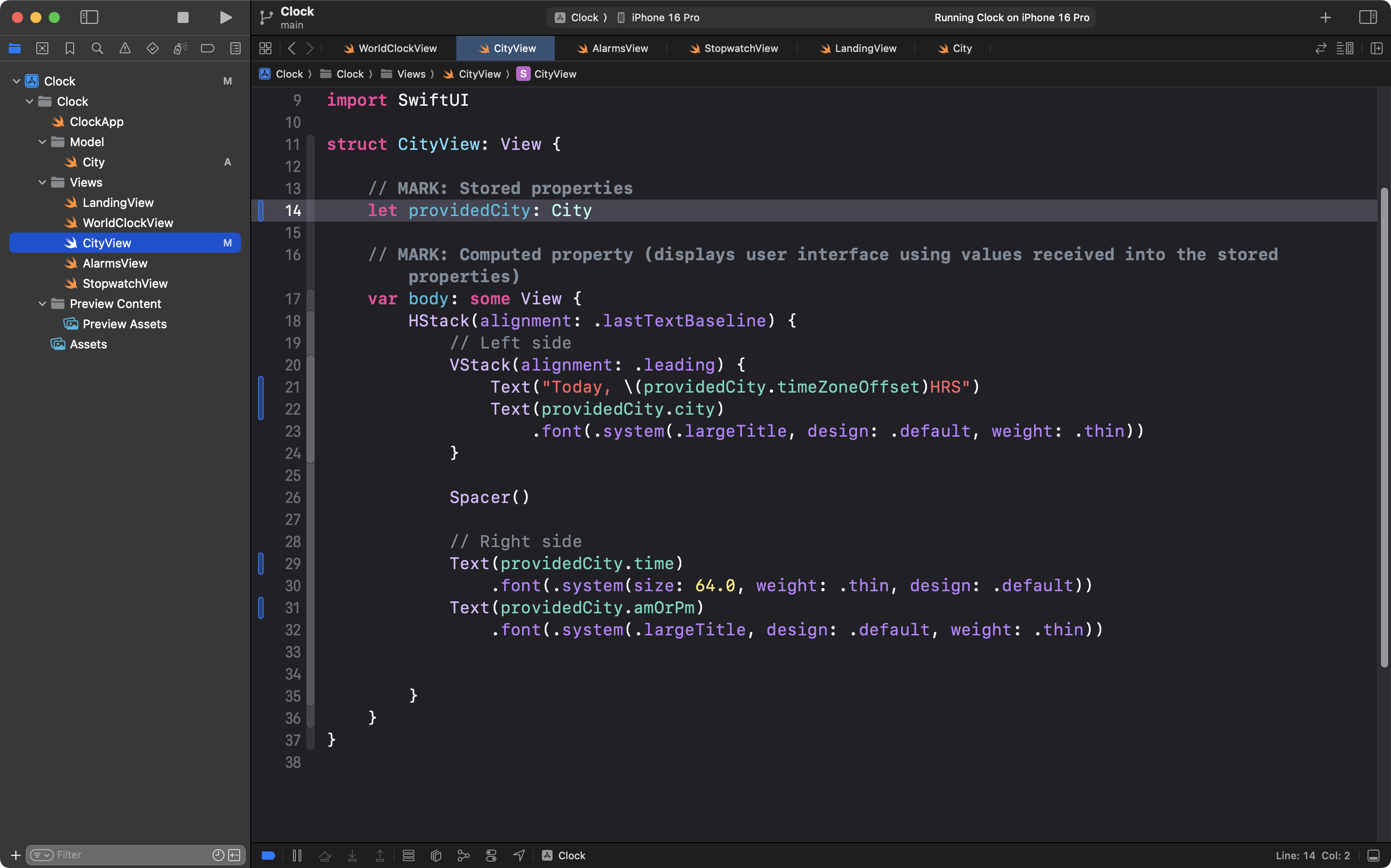
In turn, this allows us to clean up the call sites where instances of CityView are created – now just one question must be answered – which city should be viewed?
In each case, we provide a city to show information for:
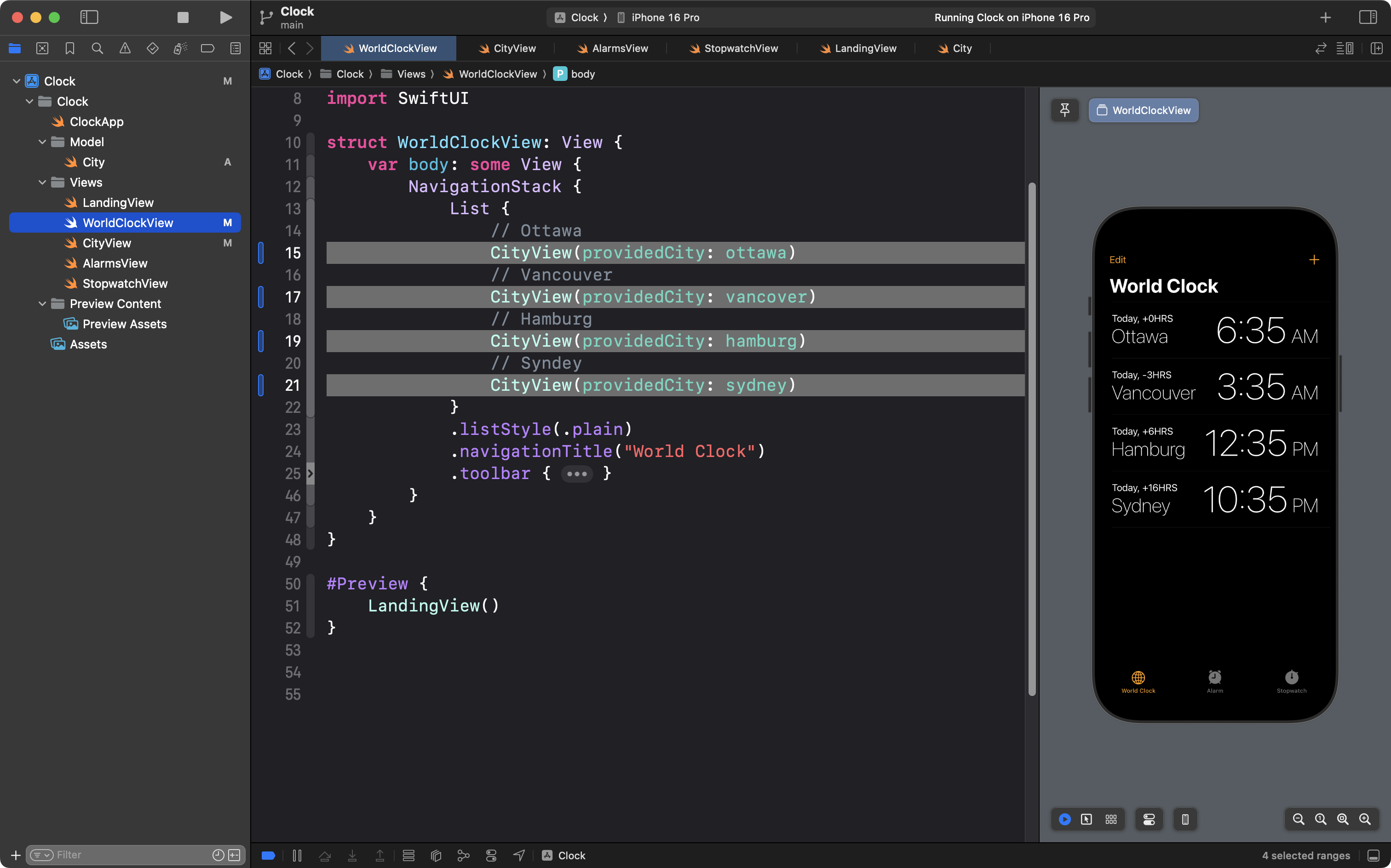
In this way, we separate concerns – we keep the data (model) in our app separated from the user interface (views).
And – as you will see in our next class – when we combine this idea with storing instances of a structure in an array – we can make our code even less repetitive.
For now – try the exercise below.
Exercise 3
EXERCISE
Using the concepts we’ve learned about today and earlier in this module, author a simple app that uses a scrollable
Listto describe the virtues of the four seasons:

Alternately, make a similar app that compares information among several instances of something that shares a common theme. You might write an app that includes an icon, the name, and a brief description of each of Taylor Swift’s four most popular albums. Or, an app that displays the four best teams (in your opinion) in a given sports league.Be sure to create a remote and then commit and push your work frequently while working on this exercise.